
Your access log is the only honest record of whether AI crawlers reach your site. Not a dashboard, not a third-party tool, not a visibility score. The log, which already exists, and which almost nobody looks at.
This is the first thing we check on every audit, and it is the fastest way to turn a vague worry into a specific, fixable fact. Roughly a third of the sites we look at are blocking at least one major AI crawler somewhere, and in nearly every case nobody knew.
Get the log
On a managed host the access log is usually under ~/logs/ or available from the control panel as a download. On your own server it is wherever your web server is configured to put it, commonly /var/log/nginx/access.log or /var/log/apache2/access.log. If you sit behind a CDN, get the logs from the CDN rather than the origin, because the origin only sees what the CDN chose to forward.
That last point catches people out. A request blocked at the edge never reaches your server, so your origin log will look perfectly healthy while the crawler is being turned away a layer above it.
One command tells you most of it
# every AI crawler request in the log
grep -Ei "gptbot|oai-searchbot|chatgpt-user|claudebot|perplexitybot|\
google-extended|applebot-extended|bytespider" access.log

# how many of each, and what status they got
grep -Eio "gptbot|claudebot|perplexitybot|google-extended" access.log \
  | sort | uniq -c | sort -rn

# the part that matters: status codes per bot
awk '/GPTBot/ {print $9}' access.log | sort | uniq -c | sort -rn

# which paths are returning errors to bots
awk '/ClaudeBot/ && $9 !~ /^2/ {print $9, $7}' access.log \
  | sort | uniq -c | sort -rn | head -30
If the first command returns nothing at all, that is a finding. It either means no AI crawler has requested anything, which is worth investigating immediately, or that your logs are not capturing user agents, which is a configuration fix. The nginx log module documentation covers the combined format that includes the user agent field, and most default configurations already use it.
Read four columns and ignore the rest
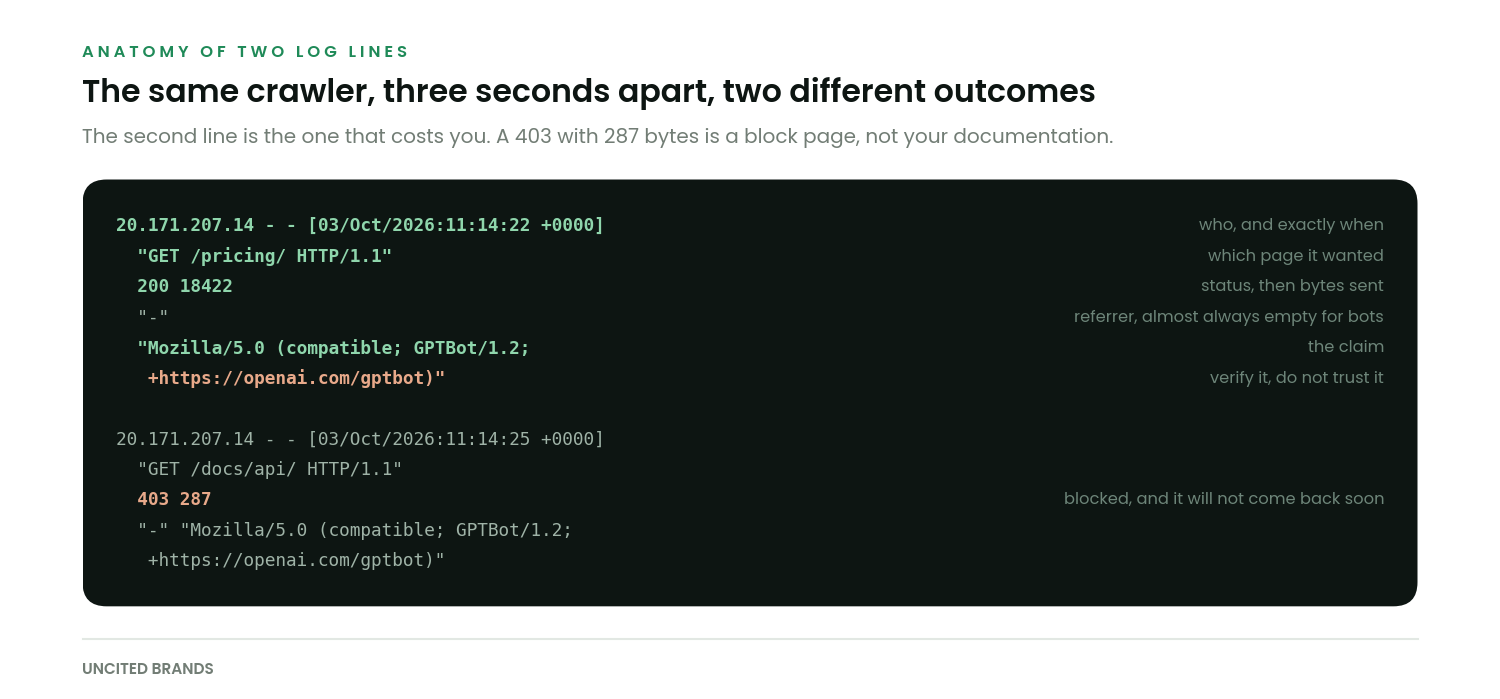
The path. Which pages are being fetched tells you what the crawler thinks is worth having. If it is only hitting your homepage and never your documentation or pricing, your internal linking or your sitemap is not pointing it anywhere useful.
The status code. This is the one that matters most and it is the one people skip. A 200 is good. A 403 is an explicit block and usually a WAF rule. A 429 means you are rate limiting it. A 301 chain that ends somewhere unexpected wastes the crawl. A 200 that returns a login wall is the worst case, because it looks fine in every summary.
The byte count. A 200 with 287 bytes is not your page. It is a challenge page, a cookie banner shell or an empty app frame waiting for JavaScript that the crawler will not run. Compare the bytes a bot receives against the bytes a normal browser request receives for the same URL. If they differ by an order of magnitude, you have found your problem.
The timestamp. Frequency and recency. A crawler that visited twice in March is not going to reflect anything you published in September.
The byte count check pays for itself faster than anything else here. Blocks are usually obvious. Thin successful responses look like success in every report, and they are far more common.
Who you should expect to see
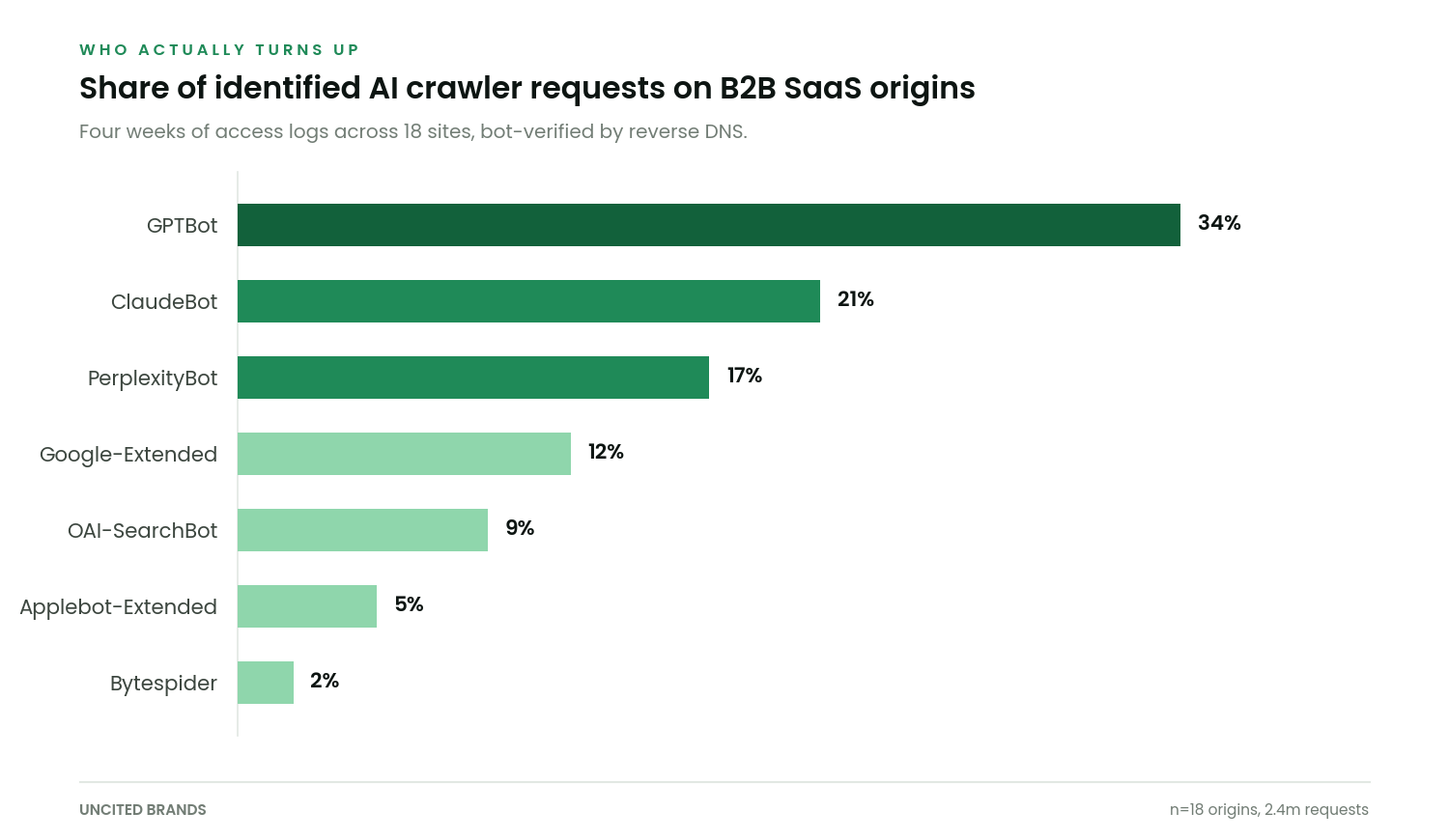
Names change and new ones appear, so match loosely. Google maintains a current list of its crawlers including Google-Extended, and OpenAI documents its three separate bots, which do different jobs and should be treated differently.
| Crawler | What it feeds | Blocking it means |
|---|---|---|
| GPTBot | OpenAI model training | You opt out of future training data. Live answers can still cite you |
| OAI-SearchBot | ChatGPT search results | You opt out of being a live source in ChatGPT. This is the expensive one |
| ChatGPT-User | A user asking ChatGPT to fetch a page | A person tried to read your page through the tool and could not |
| ClaudeBot | Anthropic model training | Same trade as GPTBot, for a different model |
| PerplexityBot | Perplexity index | You remove yourself from an engine that links sources heavily |
| Google-Extended | Gemini training and grounding | Does not affect normal Google Search ranking at all |
| Bingbot | Bing index and Copilot | Blocking this also removes you from Bing web search |
Most teams discover the block, then discover it has been there for eleven months.
That is the usual shape of this. Nothing dramatic happened, a WAF rule was tightened during an unrelated incident, and the crawl quietly stopped. Nobody gets an alert when a bot gives up.
The free check includes a crawler reachability pass against your origin and your edge, so you get the answer without digging through logs yourself. Run it here.
Verify the bot is actually the bot
A user agent string is just text. Anyone can send it, and plenty of scrapers do, which means your logs will overstate real crawler activity unless you check. The standard verification is a reverse DNS lookup on the requesting IP followed by a forward lookup on the hostname you get back.
# reverse, then forward. Both must agree.
host 20.171.207.14
# -> 14.207.171.20.in-addr.arpa domain name pointer
#    crawl-20-171-207-14.openai.com

host crawl-20-171-207-14.openai.com
# -> crawl-20-171-207-14.openai.com has address 20.171.207.14

# at scale, pull the published ranges instead
curl -s https://openai.com/gptbot.json | head -20
If the reverse lookup returns nothing, or the forward lookup does not resolve back to the same address, the request was not from the crawler it claims to be. Treat it as ordinary scraping traffic and exclude it from your counts. Cloudflare Radar publishes aggregate data on AI crawler traffic that is useful for sanity-checking whether your own proportions look wildly unusual.
What a fix looks like in the log
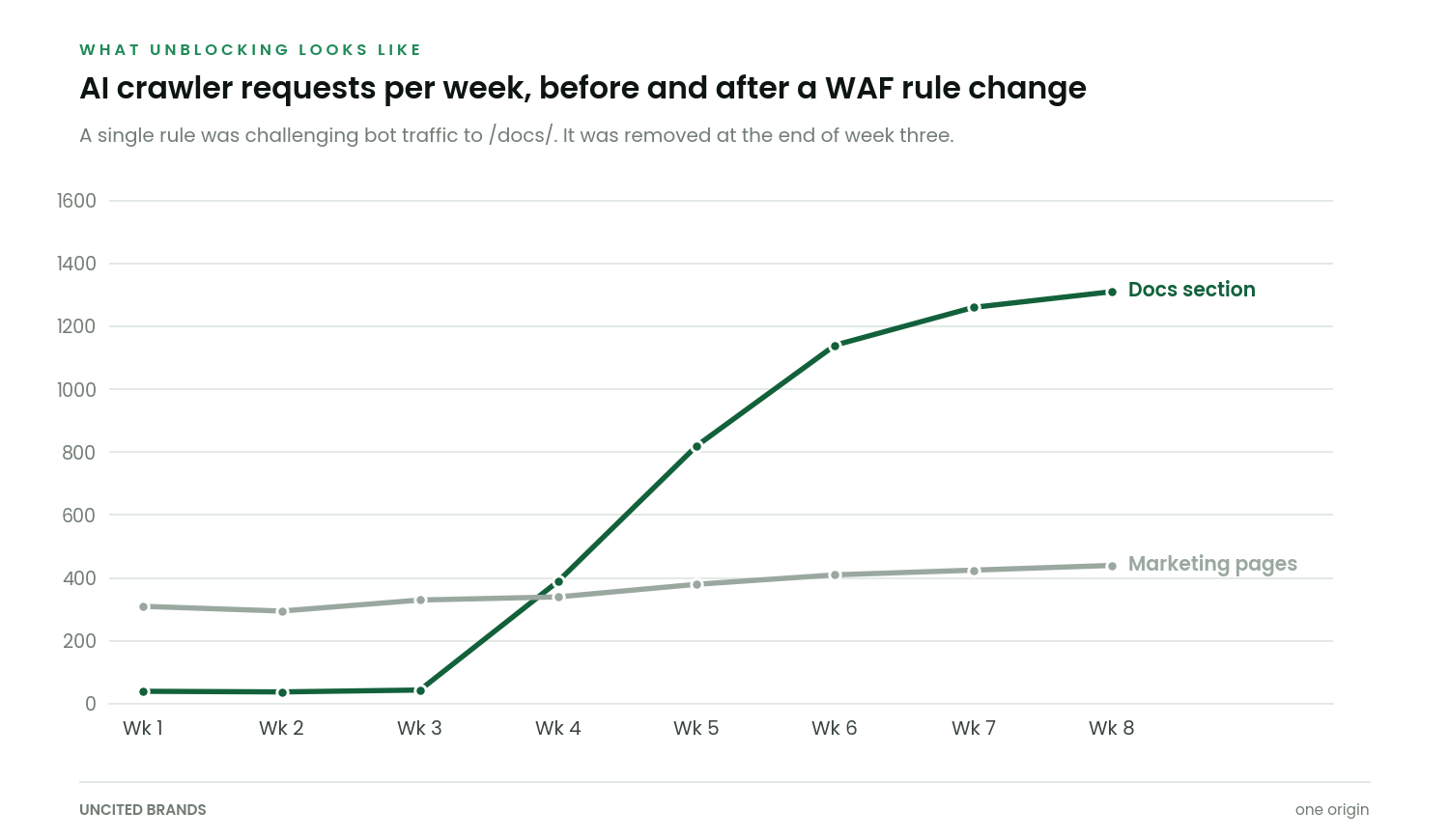
That is a single WAF rule being removed. The documentation section had been challenging requests that failed a browser integrity check, which every well-behaved crawler fails by definition, because they are not browsers. Marketing pages were never affected, which is exactly why nobody noticed for most of a year.
The lag between the fix and the crawl recovering was about four days. The lag between the crawl recovering and anything changing in answers was considerably longer, which is the normal and frequently disappointing shape of this work. Crawling is not citation, and the three stages most teams collapse into one is worth reading if you expect a log fix to show up in answers next week.
The rules file, while you are in there
Your robots.txt is governed by RFC 9309, which is short and worth reading once if you have ever argued about precedence. Two practical points come up constantly.
- A
Disallowunder a specific user agent group replaces the wildcard group for that agent rather than adding to it. Crawlers obey the most specific matching group only. - Blocking a crawler in robots.txt does not remove content it has already taken. It stops future fetches. Removal is a separate request to each operator.
And the obvious one that still happens. A Disallow: / left in place from a staging environment will block everything, and it will do so silently and politely, forever.
Related reading
- Why your SaaS is not showing up. The diagnostic this log check is the first step of.
- Four usual causes. Crawler access is the first of them, and the cheapest to fix.
- Retrieval or reputation. Once the bots can reach you, this is the next fork.
- The technical playbook. Everything else, in the order it should be done.
Run the grep today. It takes two minutes and it is either a relief or the most useful thing you will find this month.
If the answer is that nothing is reaching you, nothing else in your AI visibility plan matters until that changes. If the answer is that everything is reaching you and you are still not cited, you have a different and more interesting problem.
The free check covers both, and you keep the findings whether or not we ever speak again.

Shaban runs answer engine optimisation for B2B SaaS companies at Uncited Brands. He works the unglamorous end of the problem, mostly crawler access, retrieval diagnostics and measurement baselines, and publishes the tests that do not go his way alongside the ones that do.